Every stand style. Your choice.
From adjustable and bent-arm stands to selfie stick tripods, xShot supports all types of phone stands that can securely hold your iPhone in the required capture position.
See the setup guide xShot
xShot

What’s New · xShot 2.5.12
More stands, more practice spaces, more ball colors and more languages—with high-precision shot data at the heart of it all.
From adjustable and bent-arm stands to selfie stick tripods, xShot supports all types of phone stands that can securely hold your iPhone in the required capture position.
See the setup guideTested both indoors and outdoors. Bring xShot to your indoor practice setup or out to the driving range and keep practicing wherever you play.
Use white or yellow golf balls, including the common practice-ball colors you’ll find at the driving range.
Use xShot in English, Chinese, Japanese, Korean, French, German or Spanish.
English · 中文 · 日本語 · 한국어 · Français · Deutsch · Español
In our comparison tests against SkyTrak Plus, Square and Foresight launch monitors, xShot produced very similar shot data.
See xShot, SkyTrak+ & Square tested simultaneously belowxShot Launch Monitor
More than a launch monitor—it’s a fun golf game for everyone.
Improve your golf. Play a fun game.
xShot is an iPhone launch monitor app for full swings, chips and putts. Get shot data and 3D feedback from your iPhone camera, then play Short Game or the 18-Hole Range Game—on your own or with friends. Or connect to Muni Golf or GSPro and play real courses.
Version 2.5.12 More freedom in how and where you practice, with seven languages and high-precision shot data. See what’s new →
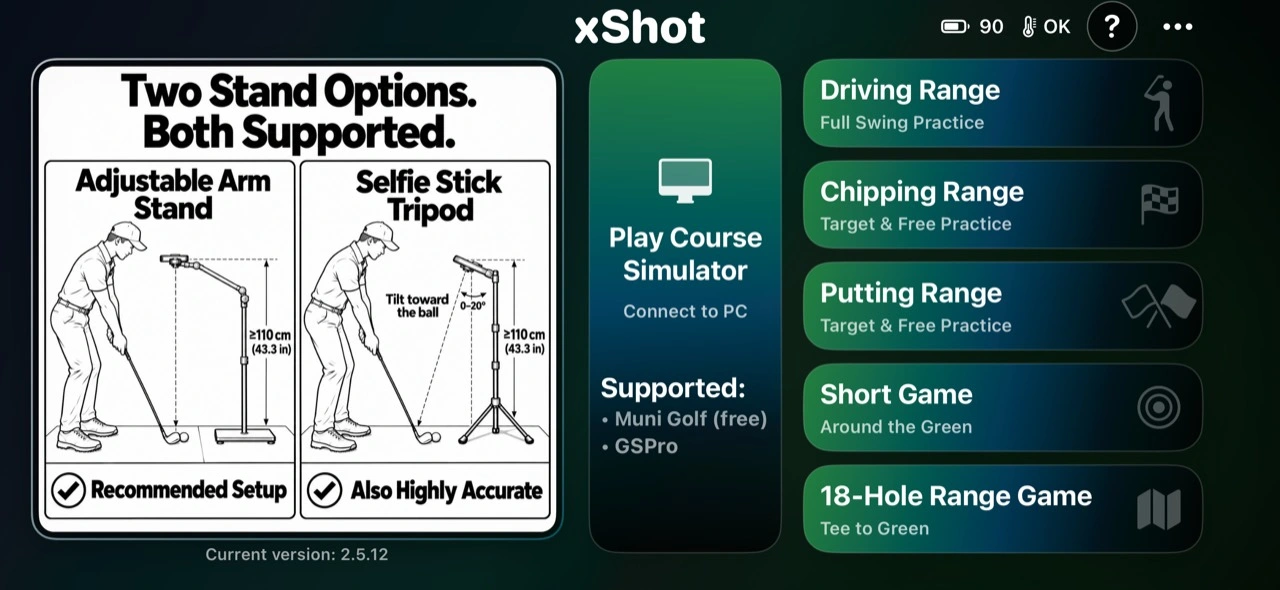
Six Modes
Build your game with focused practice, then put your skills into play on the range or on a real course in your simulator.
Full Swing Practice
Practice full swings with shot data and a 3D view of ball flight. Review carry, total distance and direction, then inspect swing feedback. No-ball training is included here.
Explore shot feedbackTarget & Free Practice
Work on chip distance and landing position. Use target practice or free practice to explore how shots land, bounce and roll on the green.
See practice feedbackTarget & Free Practice
Train putting pace and start direction. Practice toward a target or repeat putts freely while reviewing roll, proximity and finishing position.
See putting feedbackAround the Green
Turn short-game practice into a scored challenge. Play Chip & Putt or Putting Only with up to eight players taking turns on one iPhone.
Explore Short GameTee to Green · Available Now
Bring full swings, approach shots, chips and putts into a scored range-based golf game. Choose from four tee options and play with up to eight people.
Explore Range GameMuni Golf & GSPro · Available in 2.5.11
Connect xShot to Muni Golf or GSPro over Wi-Fi and play real courses with your own shots. Your club follows the game, and putts move to a green on the phone.
Explore the simulator18-Hole Range Game · Available in 2.5.8
Give every shot a purpose. Play from tee to green in xShot’s range-based game, choose your tee, and enjoy a round on your own or with friends.
Start each hole from the tee chosen for that player.
Use full swings and approaches, then chip around the green.
Putt out, follow the live scorecard and continue the round.
Four tee choices
Each player can choose their own tee. Course yardage is adjustable in the app.
Availability: included in xShot 2.5.8, available now on the App Store.
Play Course Simulator · Available in 2.5.11
xShot sends every measured shot to golf simulator software on your computer over Wi-Fi, so you can play courses in Muni Golf or GSPro with the launch monitor already in your pocket.
Free · Windows, Mac & Linux
A free golf simulator with real-world courses. Install it on your computer, open the game, and xShot finds it on your Wi-Fi.
Windows · Open API
Play GSPro courses with xShot as the launch monitor. Open GSPro Connect, choose OpenAPI, and xShot does the rest.
Pick Muni Golf or GSPro in the app. If your computer asks about the firewall, allow it.
Tap Scan. xShot finds the computer on your Wi-Fi, connects, and can send a test shot before you play.
Tap Start, place the ball and hit. Your shot appears in the game and in xShot’s 3D view with the flag at the real target distance.
Availability: included in xShot 2.5.11. Muni Golf and GSPro are separate products installed on your computer; GSPro’s Open API is sold by GSPro.
Games
Short Game and the new 18-Hole Range Game are both available now in xShot 2.5.8.
Available now
Stay around the green with two scored formats:
Available in 2.5.8
Start from the tee and combine full swings, approaches, chips and putts in a scored range environment.
Shot Data & Swing Feedback
See your shot. Understand your swing. xShot connects video-measured shot inputs with clear 3D feedback, clubhead analysis and replay. The exact data shown varies by mode and captured shot.
Club Speed, Ball Speed, Launch Angle and Side Angle when supported by the captured shot.
Club Path, Face Angle, Face to Path and Impact Offset. Estimated values remain marked Est in the app.
Carry, Total, flight, landing, bounce and roll are calculated from captured inputs, club selection and settings.
Replay the impact moment in slow motion, practice without a ball, and review saved shots and summaries.
How It Works
One camera. Three simple steps. xShot analyzes high-speed video from above the hitting area to give you shot and swing feedback.
Mount a compatible iPhone securely above the hitting area on a stable adjustable stand, then follow the in-app calibration and safety guide.
Select focused practice or a game. Use the ball, club and safe practice space required for that mode; no-ball training is part of Driving Range.
Take your shot and review the available measurements, 3D result, swing feedback and HitClip replay.
You still need a compatible iPhone capable of 1080p at 240 fps, a stable phone stand, adequate clearance and the appropriate ball, club, mat, net or open practice area for your selected mode. Keep the phone outside the swing and follow-through path.
Phone Stand Compatibility · xShot 2.5.12
xShot 2.5.12 supports all types of phone stands, including adjustable and bent-arm stands and selfie stick tripods. Choose a stable stand that can hold your iPhone at the height and angle shown below.
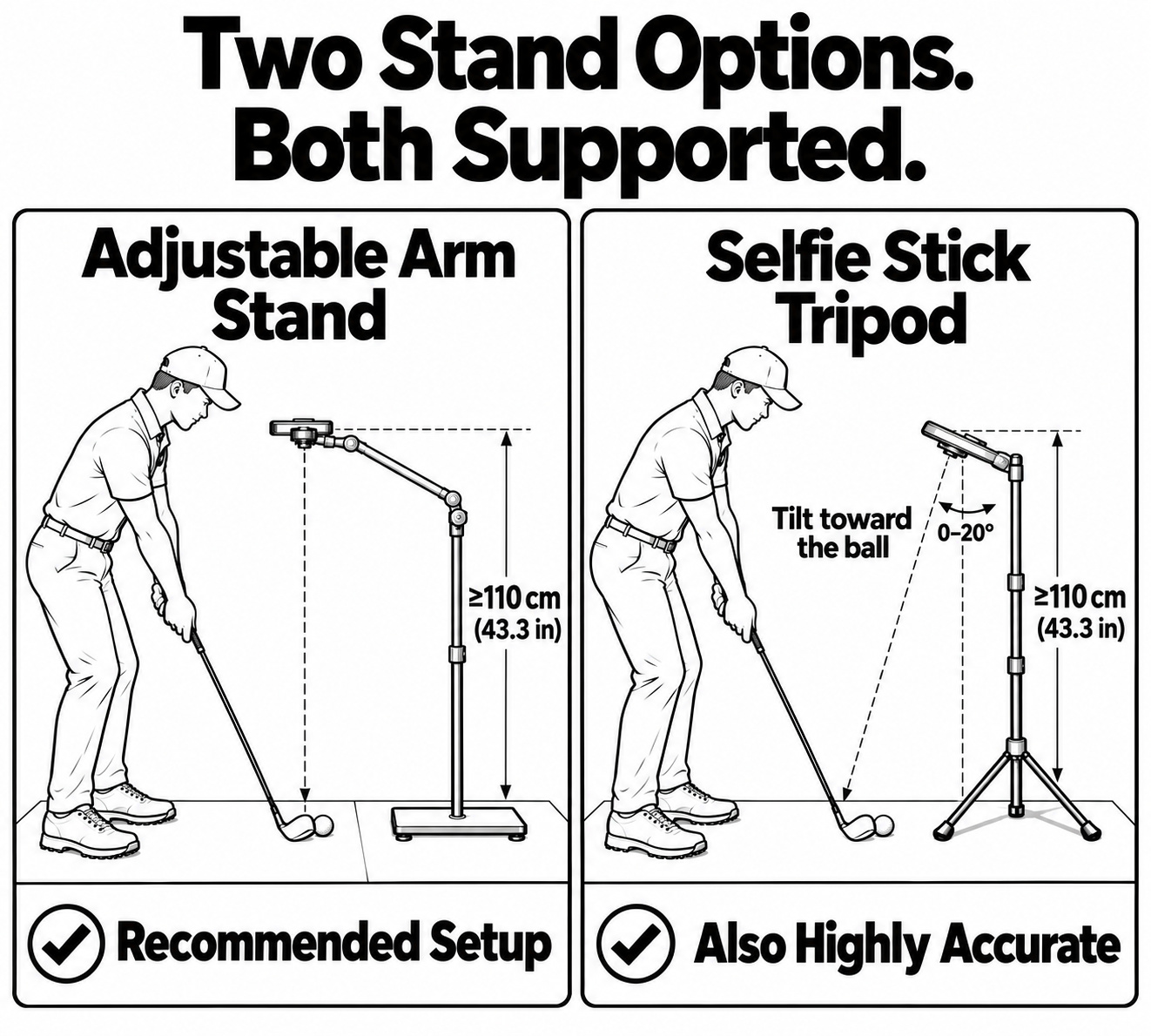
Adjustable arm stand: the recommended setup holds the phone above the hitting area, with the camera facing down.
Selfie stick tripod: tilt the phone 0–20° toward the ball as shown. For either setup, mount the phone at least 110 cm (43.3 in) above the mat and follow the in-app calibration guide.
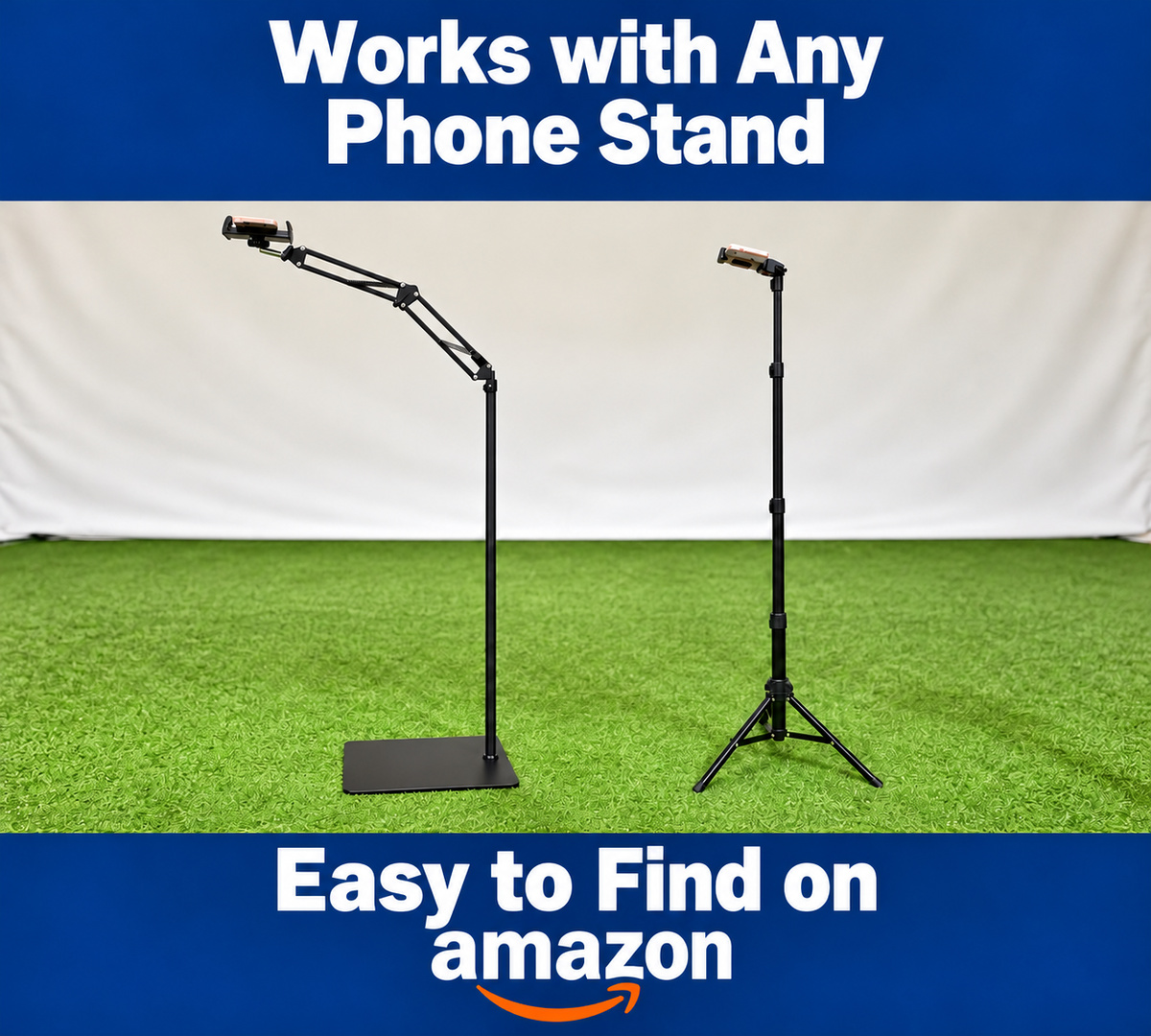
These two styles are widely available on Amazon and other retailers. Search for an adjustable arm phone floor stand or a selfie stick tripod, and check its height, tilt adjustment and stability before choosing.
Keep the phone, arm and tripod legs clear of your swing and follow-through path. Compatibility depends on achieving the setup shown, rather than the stand’s brand.
Read the phone height and setup tips · Select either image to view full size.
xShot in Action
Watch the latest comparison with SkyTrak+ and Square, then explore the iPhone camera setup, shot measurements and virtual driving range.
Latest Comparison · xShot 2.5.8 · 17:27
44 shots. Three launch monitors. One simultaneous test. Compare ball speed, launch angle, carry and total across Driver, 7-Iron, Pitching Wedge and Sand Wedge chips. Every shot is included, along with missed readings and recording reconnections.
Watch the full comparison Results & summary at 17:06Driving Range
See full-swing practice, 3D ball flight and immediate feedback powered by one iPhone.
Watch on YouTubeMeasurement
Watch the top-down capture setup and the club- and ball-speed measurements behind an analyzed swing.
Watch on YouTubeNo-Ball Training
Build swing speed with measured Club Speed and swing-path feedback in Driving Range—no ball required.
Watch on YouTubePricing
xShot is free to download. Free users receive up to 20 analyses per day; Pro unlocks unlimited practice.
Free
Up to 20 analyses per day. Download and try xShot with a compatible iPhone.
Download freeAnnual Pro · Best value
Unlimited practice. Renews annually unless canceled. Price may vary by region.
View in the App StoreMonthly Pro
Unlimited practice. Renews monthly unless canceled. Price may vary by region.
View in the App StoreFAQ
Yes. xShot uses a compatible iPhone camera to analyze full swings, chips and putts and show shot data, clubhead feedback and a 3D result. A stable phone stand, correct calibration and a safe practice setup are required.
xShot can show video-measured Club Speed, Ball Speed, Launch Angle and Side Angle, plus clubhead-path and face-angle feedback when supported by the captured shot. Carry, Total and simulated ball flight are calculated; estimated values are labeled in the app.
No. xShot uses the iPhone camera without radar or external electronic sensors. You still need a stable adjustable phone stand, a compatible iPhone and the ball, club and safe practice space required for your selected mode.
xShot is free to download, and free users receive up to 20 analyses per day. Optional monthly and annual Pro subscriptions unlock unlimited practice. See the App Store for current pricing in your region.
Practice full swings in Driving Range, chips in Chipping Range and putts in Putting Range. Play Short Game or the 18-Hole Range Game on your own or with friends.
A scored golf game in xShot’s range environment. It combines full swings, approaches, chips and putts from tee to green. Choose a 1, 3, 9 or 18-hole round.
Gold, Blue, White and Red. Each player can choose their own tee, and the course yardage for each tee is adjustable.
Short Game and Range Game support 1–8 local players taking turns on one iPhone. Play a solo round or share a game with friends.
Short Game stays around the green with Chip & Putt or Putting Only formats. Range Game starts from the tee and moves through the complete tee-to-green sequence.
No. It uses xShot’s range environment with generated Par 3, 4 and 5 holes. It is not a real-course library or online multiplayer service.
Yes. Driving Range includes no-ball training with measured Club Speed and swing-path feedback. Any displayed training flight is generated from Club Speed and club selection, not measured ball flight.
An iPhone running iOS 15.6 or later that can record 1080p at 240 fps, a stable adjustable stand, safe clearance and the ball, club and practice setup appropriate for the mode.
Calculated. For a successfully captured shot, xShot measures inputs such as Ball Speed and Launch Angle from video, then calculates Carry, Total and the simulated flight.
Yes. Play Course Simulator connects xShot to Muni Golf or GSPro over Wi-Fi and sends each measured shot to the game, so you can play real courses with your own shots.
A computer on the same Wi-Fi running Muni Golf (free, on Windows, Mac or Linux) or GSPro (Windows, with its Open API option), plus the usual xShot setup. xShot finds the computer with one tap.
Yes. Driving Range, Chipping Range, Putting Range, Short Game, the 18-Hole Range Game and Play Course Simulator are available in xShot 2.5.11.
Version 2.5.11 Is Here
Download xShot for focused practice, Short Game, the 18-Hole Range Game and Play Course Simulator with Muni Golf or GSPro. Improve your golf. Play a fun game.